
How to Use Bar Replay / Right-Click Replay
Bar Replay allows you to jump back to any candle in your session — instantly.With the latest update, Replay Mode is now fully integrated into the chart UI in two ways:A dedicated Replay button in the Price Skipper barA Right-click on any candle → Replay to this pointThis gives you a seamless way to rewind, review, and reset your view to any part of your session — all without reloading or breaking your flow.
Overview
Bar Replay allows you to jump back to any candle in your session — instantly.
With the latest update, Replay Mode is now fully integrated into the chart UI in two ways:
- A dedicated Replay button in the Price Skipper bar
- A Right-click on any candle → Replay to this point
This gives you a seamless way to rewind, review, and reset your view to any part of your session — all without reloading or breaking your flow.
⚡ Why Bar Replay Matters
Backtesting is about speed, repetition, and reviewing details quickly. The faster you can jump back, the more reps you get — and the more edge you build.
Before This Update
- Replay Mode was hidden in settings, and many users didn’t know it existed.
- Right-click replay was there, but not easy to discover.
- Jumping back often caused reloads, breaking momentum.
Now with Integrated Bar Replay
- A Replay button is always visible in the Price Skipper.
- You can right-click any candle to replay from that exact point.
- Replay is instant — just a small flicker, no reload.
👉 This is a professional-grade replay engine, designed to keep your testing fast and uninterrupted.
⚙️ How It Works
1. Enable Replay Mode
- Go to Settings > Enable Replay and toggle it ON.
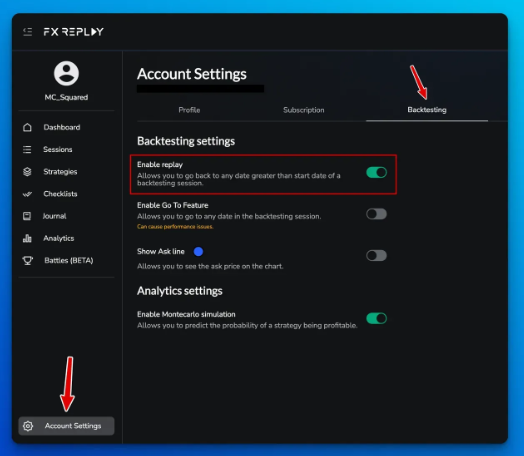
- This unlocks Replay features in your chart.
2. Use the Replay Button
- Found in the Price Skipper bar, left of the playback controls.
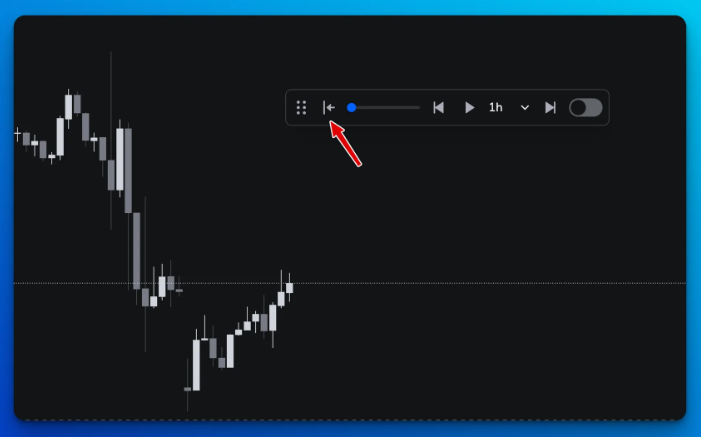
- Clicking it starts a replay session from the current candle.
3. Chart Enters Replay Mode
- A vertical line marks the replay start date.
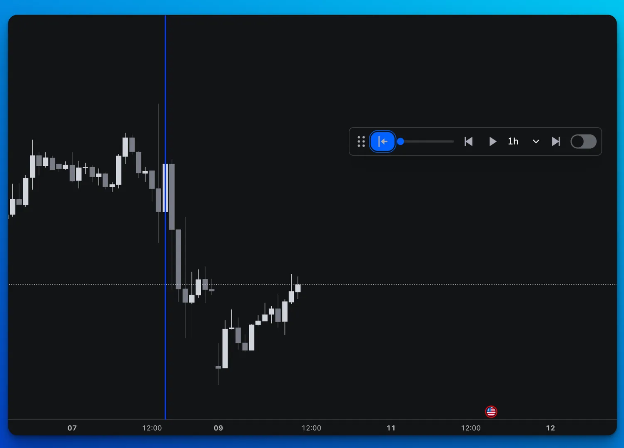
- You’ll instantly be dropped into that candle’s exact date/time.
4. Right-Click Any Candle
- Select “Replay to this point” from the context menu.
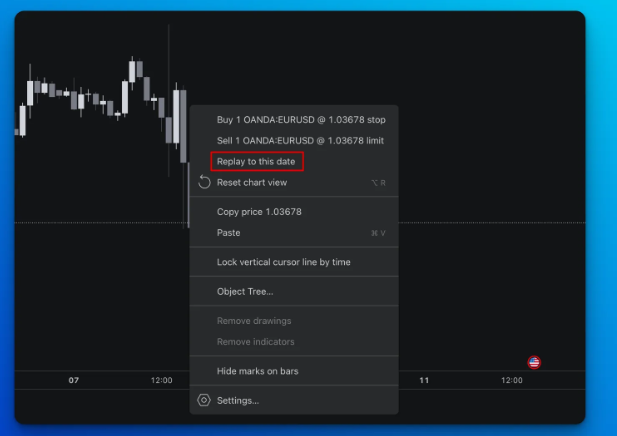
- The chart instantly resets to that candle — all future candles are hidden.
📝 Important Notes
- Replay Mode must be enabled in Settings to use either method.
- Once Replay is active, all chart elements update in real time — no reloads, just a flicker.
Related articles
Keep exploring this topic.