FX ReplayHelp Center
Product guidesFAQsCommunity
Contact support
Help CenterProduct guidesFAQsCommunity
FAQ
Getting Started
Account Management
Product Guide & Features
  • How to use the replay feature
  • Prop Firm Simulator
  • How to Delete Trades and Sessions in the Journal
  • Analyzing Your Trades: How to Use the FX Replay Analytics Page
  • Introducing OANDA: Our New Data Provider
  • What indicators does FX Replay offer?
  • What Are the Differences Between FX Replay Plans and Their Pricing?
  • How to Use the RR Simulator
  • Using the Economic Calendar Feature
  • Trading on Seconds Timeframes in Forex and Futures Markets
  • How to Use Scalper Mode for Faster Trade Execution
  • Available hotkeys for FX Replay
  • How to Use Keyboard Shortcuts & Tooltips
  • Multipair - Feature
  • Tracking Your Trades with the Journal Feature
  • What broker data sources does FX Replay use for its charts?
  • Understanding Spreads and Commissions
  • How far back does the data go? Can I trade the 1m far back?
  • How to Place Trades with Right-Click Order Execution
  • How to Drag and Place Stop Loss & Take Profit on the Chart
  • Is it possible to have multiple charts (each with different timeframes or different pairs)?
  • Comprehensive Futures Trading Guide
  • Mastering the Replay Feature
  • How to Use Bar-by-Bar Rewind
  • What are the trading session hours that FX Replay takes into account for analytics?
  • How to Use Bar Replay / Right-Click Replay
  • Analytic Metrics Defined
  • How to separate markings on your charts for different backtesting sessions?
  • How to Use Drawdown Analytics
  • What assets are available for backtesting?
  • What is the smoothing candle feature?
  • Am I able to save drawing templates?
  • How to create a backtesting session?
  • How to use tags when backtesting?
  • What candles does FX Replay offer?
  • How to use the Monte Carlo Simulation?
  • How do I enable Dark Mode?
  • How to save my Indicator settings?
  • How to add the Session Indicator?
  • How to Take Partial Profits in FX Replay?
Billing and Payments
Technical Support
Community & Resources
FXR Battles
FXR Journal
Help Center/Product Guide & Features

How to use the replay feature

FX Replay Help CenterUpdated June 26, 2026

Learn how to effectively use the replay feature in FX Replay to practice and analyze trades with real market conditions.

Replay Feature

How to use the replay feature

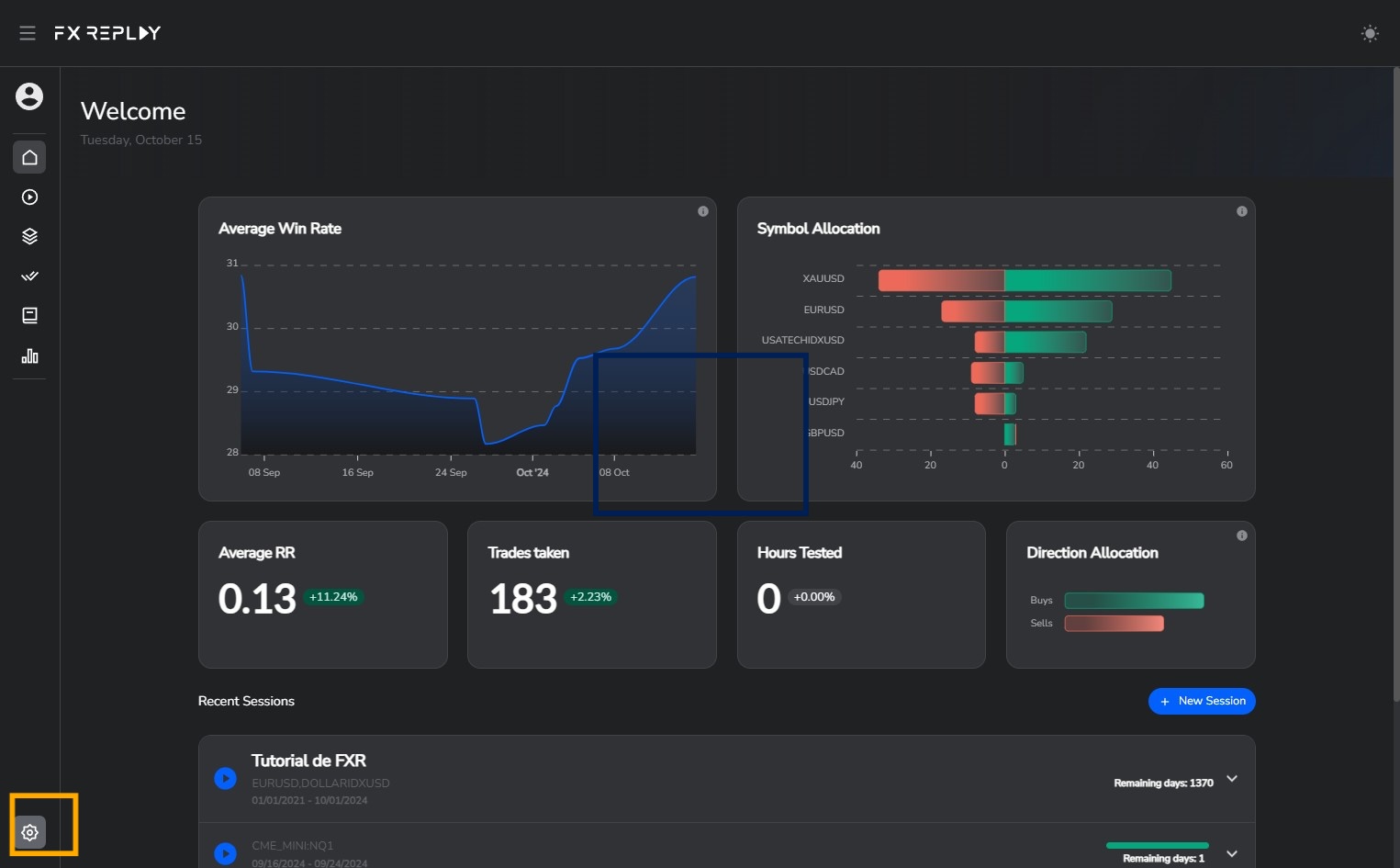
  1. Go to settings by clicking on the icon.
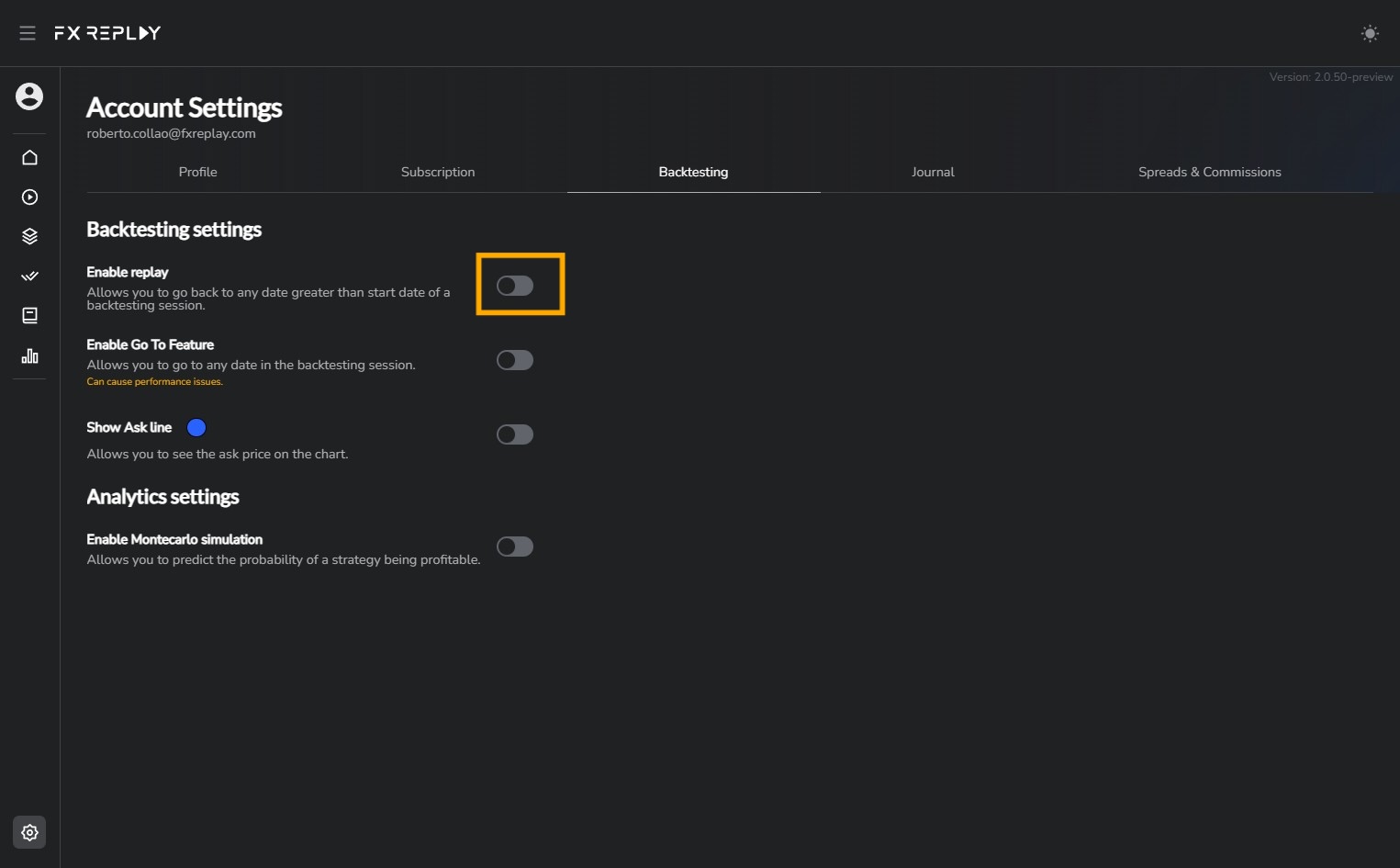
  1. Go to the Backtesting section.

  1. make sure you enable Replay on your settings page.
Related articles

Keep exploring this topic.

Refine your process
How to Use Bar Replay / Right-Click ReplayLearn how to use Bar Replay/Right-Click Replay in FX Replay to instantly jump back to any candle for faster, smoother backtestingRead guideHow to Use the RR SimulatorThis tool takes your real trades and shows how performance would shift if you had aimed for different take profit (TP) levels — without changing your entry or stop loss (SL).Read guideHow to Use Drawdown AnalyticsLearn how to use Drawdown Analytics in FX Replay to measure average, max, and min drawdown (in R) on winning trades for better risk managementRead guideHow to Use Keyboard Shortcuts & TooltipsThe Shortcut & Tooltip System in FX Replay speeds up your workflow by making every action just one keystroke away.From placing orders to navigating sessions, shortcuts let you move instantly. Tooltips show you what each button does — so you’re never left guessing.Read guide